Media Walls and TV Cabinetry: Ideas That Work
A media wall is the part of the living room most people see every evening. Designed well, it hides the equipment, holds the rest of the room together and still works when the television changes.
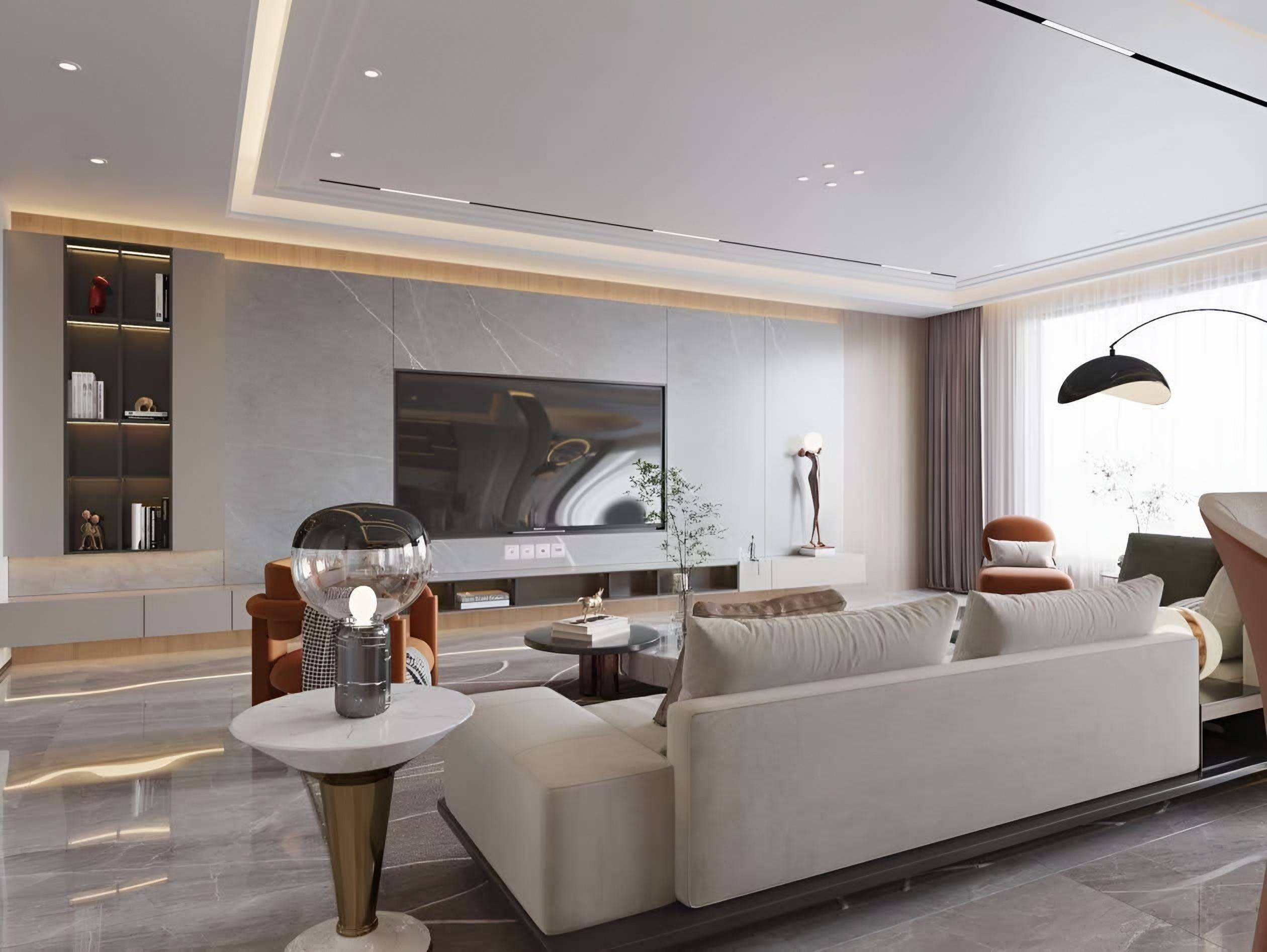
A media wall should look like architecture even when it is used for television. The screen, the speakers, the games console, the streaming box and the cables all need a home, and they need enough air to run without overheating. Done well, the joinery conceals all of this and gives the living room a calm focal point. Done badly, it becomes a row of black boxes and trailing wires that dominates the room long after the novelty of the new set has worn off.
This guide sets out the decisions we work through when designing a media wall or TV cabinetry as part of a living room scheme: positioning the screen, planning the joinery, hiding equipment, air and cabling, lighting and materials.
Start with the room, not the screen
Decide where the seating will be before anything else. The screen should sit where people look most of the time, which in many rooms means facing the sofa across a clear distance, with the seats placed so that most people can see the picture comfortably. In an open-plan living space, the media wall may need to act as a divider or to serve a second function, such as a feature wall or a display for art and objects. The television is one element of the composition, and the room should be designed around the seating and the views first.
- Measure the distance from the main seats to the wall, and the width of the viewing angle.
- Set the screen height so that its centre sits close to seated eye level; a screen that is too high causes neck strain over long sessions.
- Check the wall for windows, doors and radiators that might interrupt the composition or glare on the screen.
- Allow for the screen's size to change; a wall designed for one generation of televisions may need to accept a larger one later.
Joinery depth and proportion
Depth is the first practical decision. A recessed screen gives a cleaner, more architectural effect, but it needs a niche that is deep enough for the set and its brackets, with space behind for the connections. A shallow niche can look elegant, while a deeper one can house equipment at the back. Keep the proportion of the wall in mind: a wide, low media wall suits a long room, while a full-height panel can frame a screen in a more formal space. Align the joinery to the room's other lines, such as windows, doors and ceiling beams, so that the wall feels planned rather than added.
Hiding the equipment
Most equipment does not need to be seen. Consoles, set-top boxes, amplifiers and streaming devices can sit in closed cabinets with doors or drawers, provided the cabinets are ventilated. Open shelving suits objects, books and display, while closed sections keep the technology out of view. Remote controls can be kept in a drawer or a shallow tray, so that the wall remains tidy when the room is used by guests. Where a screen must be visible, a fabric-fronted speaker panel or a concealed sound bar can keep the sound quality without introducing clutter.
Mechanisms for a clean look
Some designs conceal the screen completely when it is not in use. Lifting mechanisms or sliding panels can bring the screen forward for viewing and return it into a cabinet, and they are a useful solution in rooms where the wall must also serve as a display for art. Any moving mechanism needs careful specification for weight, clearance and noise, and it should be installed by specialists who understand the load. Check the warranty and maintenance requirements before choosing a mechanism.
Air, heat and ventilation
Electronic equipment generates heat, and an enclosed cabinet can trap it. A media wall that hides several devices needs ventilation to keep them within their operating temperatures. Plan vents at the top and bottom of the enclosure, or a discreet rear gap, so that warm air can escape and cooler air can enter. Avoid placing equipment directly behind a closed door or in a sealed box. Where possible, locate the most heat-producing devices near a vent or a route for air to leave the cabinet.
Cables, power and future changes
Cables are the most persistent problem in a media wall. Plan the routes before the joinery is fixed: sockets at the correct heights and positions, conduits for the screen and speakers, and a clear path for the cables from the equipment to the screen and to any wall or ceiling connections. Allow spare capacity for the devices you may add later, and consider a single central point for power so that the cabinet can be switched off in one place. Electrical work, including new sockets and any concealed wiring, must be carried out by a qualified electrician.
A media wall should also be designed for the technology you may not yet own. Leave space for a future console, a larger set or a different audio system, and consider ducting or a spare conduit for cabling that may be needed later. These decisions are usually much easier to make at the design stage than to add later.
Lighting and display
Light makes a media wall feel finished. Concealed cove lighting, lit niches and shelves, and a soft backlight behind the screen can create a warm glow that relates the wall to the rest of the room. Choose a light colour that complements the materials and does not reflect on the screen. Dimming is essential, so that the room can be softened for watching a film without losing the character of the wall.
Materials that suit a living room
Materials for a media wall should be chosen for their calm presence and their ability to hold a finish over time. Veined stone or marble behind the screen creates a dramatic backdrop, as in the Terracotta Residence, where a grey veined marble wall with a lit niche gives the room a clear focal point. Timber panelling is warmer and easier to work with in large areas, and it suits rooms where the furniture is also in natural tones. Glass-fronted cabinetry can display objects while concealing equipment. Whatever the material, ensure the screen does not reflect light from windows, and that the finish is compatible with the heat and the cabling behind it.
Fixing to the wall
Wall-mounted screens and heavy cabinetry must be fixed into a wall that can carry the load. Check the construction with the builder or a qualified professional before fixing, particularly for plasterboard or hollow walls. Structural and building work must be carried out by licensed professionals, and fixing details should be agreed with them, not left to the joinery alone.
A checklist before you design
- Decided the seating layout and the viewing distance before fixing the screen position.
- Chosen the screen size and allowed for a larger one later.
- Planned depth, ventilation and cable routes around the equipment.
- Positioned sockets, conduits and data connections before the joinery is fixed.
- Confirmed the wall can take the load and the fixings.
- Layered lighting that complements the materials and does not reflect on the screen.
A media wall that is planned with the rest of the living room tends to look as though it was always there. If you are designing a living room, start a project with a floor plan, the seating layout and your equipment list, and we will design the wall around the way you watch, listen and gather. Our custom cabinetry work covers this kind of joinery.
Continue reading
Tell us about your space.
Share your floor plan, room photographs and what you hope to create.