Designing a Home Office That Works
A home office is judged by the hours spent in it, not by how it looks when empty. Plan the work first: the desk, the light, the storage and the sound will decide whether it is pleasant to use.
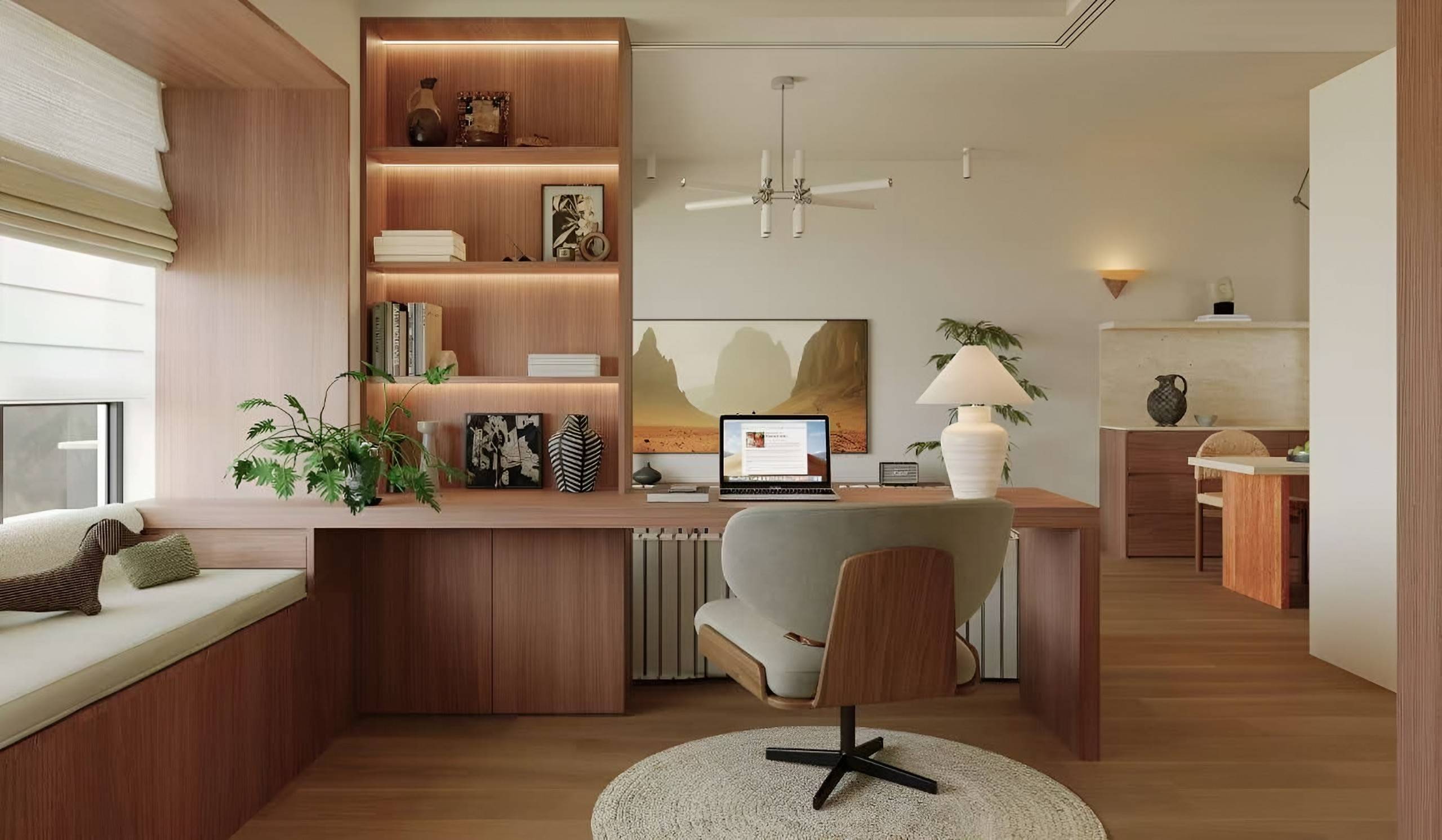
A home office that works is planned around the actual work done in it: the screens and papers used, the calls taken, the hours spent seated, and the amount of storage needed. Many home offices fail because they were added to a spare room or a corner without that analysis. The desk is too shallow for the screens, the light falls across the monitor, the cables trail across the floor, and the chair is never quite right. Each problem is small on its own; together they make the room unpleasant to use every day.
This guide covers the decisions we work through when designing a custom home office: the desk, layout and glare, storage, cabling, lighting, acoustics and seating.
Define the work before the furniture
Begin with a short list of what the room must do. Will you spend most of the day seated and typing, or will you read, draw or meet people? Do you take video calls, and if so, what will be visible behind you? Do you need to keep client files, books or equipment in the room? Is the office used only by you, or does it also serve as a guest room or a family space? These answers determine the size of the desk, the amount of storage and whether the room needs a door that closes.
- List the equipment: monitors, laptop, printer, scanner, speakers, and any drawing or production tools.
- Estimate the paperwork and the items that must be stored within reach.
- Note how often you take calls, and where the camera will face.
- Decide whether the room must be separated from the rest of the home, visually or acoustically.
Desk size and depth
Depth is the measurement most often underestimated. A desk must hold the screens at a comfortable distance from the eyes, usually in the region of 50 to 70 centimetres, and leave room for the keyboard and wrists in front of them. A shallow desk forces screens too close; a very deep one pushes everything out of reach. Many people work comfortably on a desk of around 60 to 75 centimetres deep, but check this against your own screens and the way you sit.
Length should accommodate the equipment with space to spare. A second monitor or a laptop beside the main screen needs an extra 40 to 60 centimetres, and a clear area for papers and writing is valuable even when the desk looks tidy. Leg room matters too: the desk should be high enough, and the knee space clear of drawers and cabinetry, so that you can sit squarely to the work. If the desk will be used for long periods, consider a height that can be adjusted, or a surface set at a height that suits standing for part of the day.
Layout, daylight and glare
Position the desk with the window to the side rather than directly in front or behind. Daylight from the front puts the screen in glare and shines into the eyes; daylight from directly behind puts the face in shadow and creates reflections on the screen. A side window gives even, flattering light and reduces reflections. If the room has only one window, use sheer or light-diffusing curtains and position the screens to avoid direct reflections from the glass.
Think about the view as well. A desk facing a wall can feel enclosed, while one facing a window can create strong contrast between the bright outdoors and the screen. A desk set at an angle to the window often works well, and it allows a calm backdrop for video calls. Check the sightlines from the door, so that the room feels welcoming when entered.
Storage that suits the way you work
Storage should match the materials you actually handle. Closed cabinets hide papers, printers and equipment, and keep the room calm when it is used for guests or visitors. Open shelving suits books, objects and frequently used items that you want to see. A drawer beside the desk is the most useful place for daily items such as pens, chargers and notebooks, and a deeper cabinet can house a printer or a shredder on a low shelf.
Plan the storage at the same time as the desk, so that cabinets sit at the correct height and do not reduce leg room. Built-in joinery, as in the Oak Apartment, can combine a desk, shelving and a window seat in one composition, with lit shelves that make the room feel finished in the evening.
Cable management and power
Cables are the most common source of untidiness in a home office. Plan sockets before the desk is fixed: position them at the back of the desk and at the height of the work surface, and provide enough outlets for the equipment you own now and the equipment you may add later. A cable channel or a cable tray behind the desk keeps leads tidy and allows them to be reached without moving furniture. Where a desk will be used for charging, consider a concealed power point or a surface charger built into the desk.
All electrical work, including new sockets and any data cabling, should be carried out by a qualified electrician. Think about the building's broadband connection and wireless signal too; a wired connection to the desk can be more reliable for calls, and it is far easier to plan before the walls are finished.
Task and ambient lighting
A home office needs two kinds of light: even ambient light for the room, and focused task light on the work surface. Ceiling fittings or wall lights should provide the general level, arranged so that they do not shine directly into the screens. A task lamp beside the desk, with a diffuse shade, lights the papers and keyboard without creating glare on the monitor. Choose a warm to neutral white light, which is comfortable for long periods, and make sure the lighting can be dimmed for calls and evening work.
Acoustics and privacy
Sound is a quiet but significant problem in home offices, especially in rooms with hard floors, large windows and bare walls. Soft finishes help: a rug, curtains, upholstered seating and a few panels or filled bookshelves absorb sound and reduce echo. Good door seals and a solid door reduce noise from the rest of the house, and a room positioned away from kitchens, bathrooms and living areas is usually more peaceful. If calls are frequent, consider whether a second layer of soft finish on the wall behind the chair would make your voice clearer on the other end.
Seating and ergonomics
The chair is the piece most often compromised on. It should support the lower back, allow the feet to rest flat on the floor, and adjust in height and arm position so that the elbows can rest comfortably beside the keyboard. Choose upholstery that is comfortable for long hours and can be cleaned easily. If the desk is used for both writing and reading, a second, more relaxed seat in the room can break up the day and make the office feel less like a workstation.
A checklist before you design
- Listed the work, the equipment and the storage needs.
- Measured the screens and chosen a desk depth that holds them at a comfortable distance.
- Positioned the desk to avoid glare from the window and reflections on the screens.
- Planned storage, sockets and cable routes before the finishes are fixed.
- Layered ambient, task and accent light, with dimming.
- Added soft finishes to reduce echo and sound from the rest of the home.
A well-planned office can be as considered as any other room in the home. If you are planning one, start a project with a floor plan, a list of the equipment you use and a note of the calls you take. We can design the desk, storage and lighting together, as part of our custom furniture service, so the office feels like a natural part of the home rather than an afterthought.
Continue reading
Tell us about your space.
Share your floor plan, room photographs and what you hope to create.